
Difference Between Modem and Router
 Modem vs Router
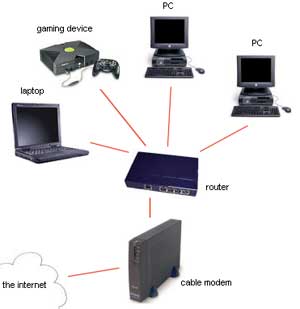
When subscribing to an ISP, they would usually provide you with a box that connects to your phone line and to your computer. This box is usually both a router and a modem. A modem is a device that negotiates the connection with your ISP through your telephone line while a router is a device that is used to connect two networks together, in this case your network to your modem.
Traditionally modems were stand alone devices that can be connected straight to your computer or to a router. It connects to the router via the standard RJ45 and with the telephone line via the smaller RJ11. Its job is simply to translate data from one protocol to another since telephone lines do not use the same signaling and transmission methods that are used in computer networks. Because of this, data isn’t being screened by the modem and any potential threat would still go through to your network.
Routers only use RJ45 since it is understood that it would only connect to computer networks. Its job is to examine a data packet and determine where it should go; it chooses the route the data should take, thus the name router. It is in a router where firewalls are implemented in order to screen out potential attacks or threats that might try to gain access to your network.
You should know that modems are the means to connect to the internet and without modems the internet would not exist. Routers on the other hand, are not really essential for internet communication. It is still possible to connect to the internet without routers just like in the old days with internal PCI modems. But you should remember that the main job of the router is to protect you from possible threats and malware, and this shouldn’t be taken very lightly.
Summary:
1. A router is used to connect two or more networks while a modem is used to connect to a phone line
2. A router only connects to RJ45 connectors while modems need an RJ45 and an RJ11 for the phone line
3. A router provides security measures to protect your network but a modem does not
4. A modem is essential to connect to the internet while a router isn’t
- Difference Between Sony Cybershot S Series and W Series - December 22, 2012
- Difference Between Samsung Galaxy S3 and iPhone 5 - December 21, 2012
- Difference Between Samsung Galaxy S2 (Galaxy S II) and Galaxy S 4G - December 20, 2012
Search DifferenceBetween.net :
 Email This Post
: If you like this article or our site. Please spread the word. Share it with your friends/family.
Email This Post
: If you like this article or our site. Please spread the word. Share it with your friends/family.


thank u .. thanks a lot… was confused… cheers
Very useful information, I teach a class and use these terms often and this helped me explain i a little better, thank you!
Where May I access the battery pact from a out dated modem?
Thanks for the cool piece of knowledge
Well written, to the point and I loved the summary part..The concept of the whole website is also very good…
A Suggestion – The article could be a little more in depth.
I need some help. I bought a Video Phone and use a modem with 4 ports to connect to connect to the Video Phone. My problem is that the Video Phone (actually an older model) worked well the first weekend. After that I could only make calls for ten minutes at a time. Then I could not get to make calls at all at times or if I did get through, the person on the other end could hear me and I could not hear him. Mind you that is using Video Phone to regular analog or cell phone or Video Phone to Video Phone).
The first Video Phone I used belonged to a cousin of mine when I saw this problem developing. I had already ordered the newer version of the phone for myself. It has the same problem as the older version. I had the Video Phone company check my speed and check for firewalls etc. I also had persons from the Internet Provider come to my house and check it out. To this date we cannot decide whether it is the speed, the line, the modem etc. In fact, on a trial basis the service provided claimed to have increased my speed but I have noticed no difference.
I took the Video Phones to a neighbour downstairs my building and they both worked the first time. I also took them there again today and tried her modem (they worked) and my modem (and they worked for a while until I tried Video Phone to Video Phone… I could see images on one but not on the other). I then left one at her house with her 1 port modem and took the other to my home upstairs with my 4 port modem but by then the Video Phones were claiming to be unregistered and refused to work.
Can anyone help me?
Would a router work better? Since this problem I have made my computer wireless so even that is not attached to the modem with 4 ports? I am at a loss. Any help will be greatly appreciated.
Thanks
This has been the MOST helpful website of all the searches that I have done to understand routers/modems. Thank You!!!
Amazing Answer…you rock
ok.. thnks 4 d information
I am so glad you posted this article. My friend’s 13-year-old son just would not listen to me about what the basic components are. He insisted that PC meant “portable computer,” and that the monitor was “the computer,” while the actual computer was the “modem.” Finally, he insisted that the Westin modem sent to him by Century Link was just a router. He was very obstinate and disrespectful. I am sending him this article, because I know somebody is going to laugh at him and not be as nice as I was when I was trying to explain.
Thanks again!
that is an amazing, very well explain and clear ifno about modems and routers… just like your shirt says” plain english and easy” thank you a lot!
Where is the rest of the video??? Under what title? I want the 45 second fix!!!!
So when CenturyLink tells me that their modem is a wireless router do I still need a router. Should I just get their modem and then get a router anyway?
I have been chasing around for days to learn this info. You don’t even want to know… I bought an iPod touch and want to know how I connect it to my DSL. Can I do it with a router, which will allow me to access iTunes, Weather, etc? Your video is awesome and I will watch it again. Thanks!
Thank you!
very nice answer thank you .i learn about this subject thank you very much.
Hi,
Thanks for the information they are very useful and easy to understand.
I just wanted to know because Im living on campus but we have to use cable connection because there is not wireless. So I have been having problems with people snooping on me and I was wondering should I get a router or a modem in order to access the internet safely.
Thanks and I hope to hear from you.
Uhhh there’s a lot of wrong information here. Someone needs to take CCNA.
I can’t understand difference between routerand modem. Please help me
thank you sir. i am student of 1st year
Thanks , very good information. Maybe you could help with my problem. Suddenly my internet speed has slowed down so much that it takes a few minutes to D/L a page. How can I tell if it’s the modem, computer, or internet service causing the problem? Thanks
I got century link as my provider after having spectrum for ever, bt sice i got century link i cant connect to wifi it want provide the dns. Threw out installing the wifi modem i hadnt really paid attention until i read saw it bt i5s saying its a router, but century link says no modem. I even gave serial number still says modem. Help
Thank u so much it is very much usefull for technical students & at interview times as well.