
Difference Between LPR and RAW
LPR vs. RAW
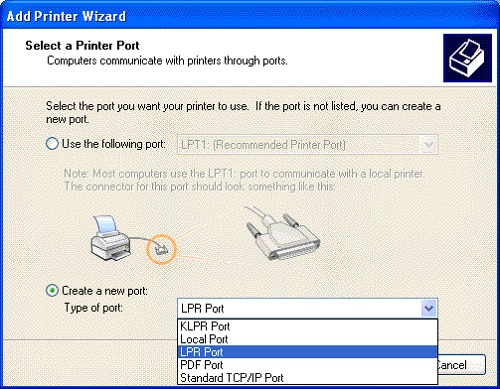
Two common networking computer protocols are LPR and RAW. Both LPR and RAW protocols are involved with network printing. The concept of network printing entails the printing of documents by multiple users without using a direct connection or cables between computers and printers.
The LPR protocol is a shortened term for Line Printer Remote protocol. The LPR protocol serves as a system that allows computers and printers to work with each other in a network. The word “remote” implies that a print job from a computer in another place can be carried out and performed by a printer that is not in the same location as the other machine, as long as the two are connected to the same network.
The LPR protocol works by using a TCP/IP connection (transmission control protocol/Internet protocol) and LPD (Line Printer Daemon). The TCP/IP serves as the channel for the order or instruction to go from the computer to the printer, while the LPD is software or a program installed inside the computer to allow the user to print a document or any kind of material using instructions in the computer.
The LPR protocol is initially designed for the UNIX computers, but it has been used after its development in other computer systems and platforms. It is often referenced as RFP1179. It can be used as the protocol for systems that don’t support RAW or other alternative protocols.
This particular type of protocol allows print queues since it can receive print jobs from numerous computers and users. However, in terms of errors, the protocol only displays a single and undetailed error status report. An example of this is a dialog box that says “Printer Error” with no specific details about said error.
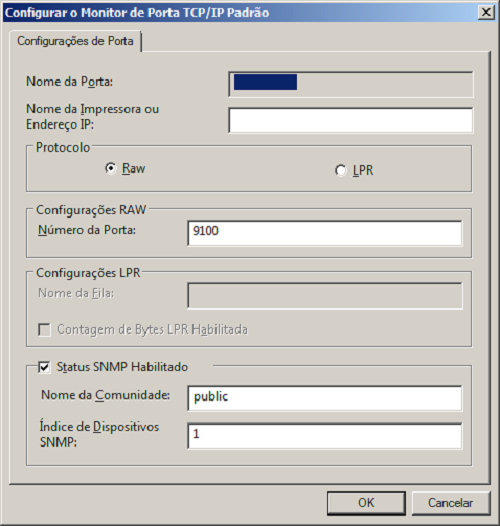
The RAW protocol is one of the common computer languages that documents are translated into before being sent to a networked printer. The printer interprets the protocol and prints the document. The RAW protocol is used when the computer user wants to print a complicated document that entails more than texts or letters. The protocol enables the computer to translate the document into RAW form before sending it to the printer, which understands the given language and job.
The RAW protocol is the default protocol for systems that do not use Windows OS and for Standard TCP/IP. It is characterized and known as Port 9100. The advantage of this protocol is that it sends data without further processing and has smaller packet headers. This protocol also has fewer networks overhead.
Both RAW and LPR protocols require drivers in order to perform the task of printing the document after the computer gives the command to print.
Summary:
1.Both LPR and RAW protocols are used in network printing depending on the computer’s operating system. Both protocols can be used for print jobs.
2.Both protocols function using the TCP/IP and are enabled to communicate between the computer and printer.
3.LPR protocol is the most common computer protocol. It is often used in Windows OS and other computer platforms. On the other hand, RAW is the default protocol for non-Windows computers. The LPR protocol can be substituted for the RAW protocol if the latter cannot function and doesn’t respond while on a print job. This makes the LPR protocol more flexible and universal compared to the RAW protocol.
4.The LPR protocol is known as RFP 1179, while the RAW protocol is identified as Port 9100.
5.The LPR protocol requires LPD, or Line Printer Daemon, to function, while RAW protocol creates a data type with the same name in order to perform a print job. Additionally, the RAW protocol sends the data without further processing.
6.A disadvantage of the LPR protocol is its generic error message; it states that there is a printer error without specifying the kind of problem encountered.
- Differences Between Fraternity And Sorority - January 8, 2014
- Differences Between Lucite and Plastic - January 7, 2014
- Differences Between Oil and Butter - January 6, 2014
Search DifferenceBetween.net :
 Email This Post
: If you like this article or our site. Please spread the word. Share it with your friends/family.
Email This Post
: If you like this article or our site. Please spread the word. Share it with your friends/family.
2 Comments
Leave a Response
References :
[0]http://dingetje.homeip.net/dokuwiki/freesco/manuals/clients/winxp/printing?s[]=one&dokuwiki=a2c9ee51d1756be002a8a8b4bb00b11d
[1]https://superuser.com/questions/431076/how-to-connect-computers-to-a-network-printer-behind-a-router


This is probably the most common network printer misdiagnosis. The first sign is a backlog of print jobs stuck in the printing queue with the first job showing “Print Error”. Deleting the job results in subsequent jobs hanging and showing the error.
The problem stems from the Windows TCP/IP printer setup defaulting to RAW and does not appear in the printer wizard menus. It must be accessed by a convoluted process after the new network printer has been setup – by right-clicking the printer and choosing Properties, then the Ports tab, then highlighting the IP port that the printer is connected to, and selecting the Configure button.
I have serviced hundreds of IT staff at various businesses who have literally torn apart their networks assuming that an incorrect driver, bad patch cable, incorrect router settings, incorrect firmware or IP conflict was the culprit.
Thank you very much. It`s very useful!!